
Table of Contents
Mobile Field Teams: How to Keep Remote Workers Connected from Anywhere and Stay Connected while Managing Remote Teams and Remote Employees
In a world where the traditional office is giving way to remote work, managing mobile field teams has become both an opportunity and a challenge. The flexibility of working remotely allows teams to deliver faster results, but staying connected and productive across distributed teams requires structure, technology, and smart communication practices.
For service-based businesses, especially those using WorkDash, the ability to manage field teams, automate workflows, and track productivity in real-time is essential. Unlike general-purpose tools like Microsoft Teams or Slack, WorkDash is designed specifically to help service providers, technicians, and contractors stay connected and coordinated—no matter where they are.
This article explores how to effectively manage remote field teams, boost productivity, and maintain strong teamwork while ensuring seamless collaboration between office staff and those working in the field.
What Makes Managing a Remote Team So Challenging?
Managing a remote team is about much more than messaging and check-ins. It’s about maintaining visibility, accountability, and communication across different time zones and work environments.
Remote workers often face unique barriers: lack of direct supervision, inconsistent communication, and challenges with tracking progress. When team members are out on-site, poor coordination can lead to missed deadlines or miscommunication with clients.
WorkDash helps overcome these issues by providing real-time communication, task management, and field tracking tools—all integrated into one workspace. With it, managers can keep everyone aligned without relying on manual updates or endless emails.
How Can Businesses Keep Remote Field Teams Connected?
The key to keeping remote employees connected lies in combining structured communication with the right technology. While tools like Slack and Microsoft Teams enable instant messaging, they aren’t enough for field coordination.
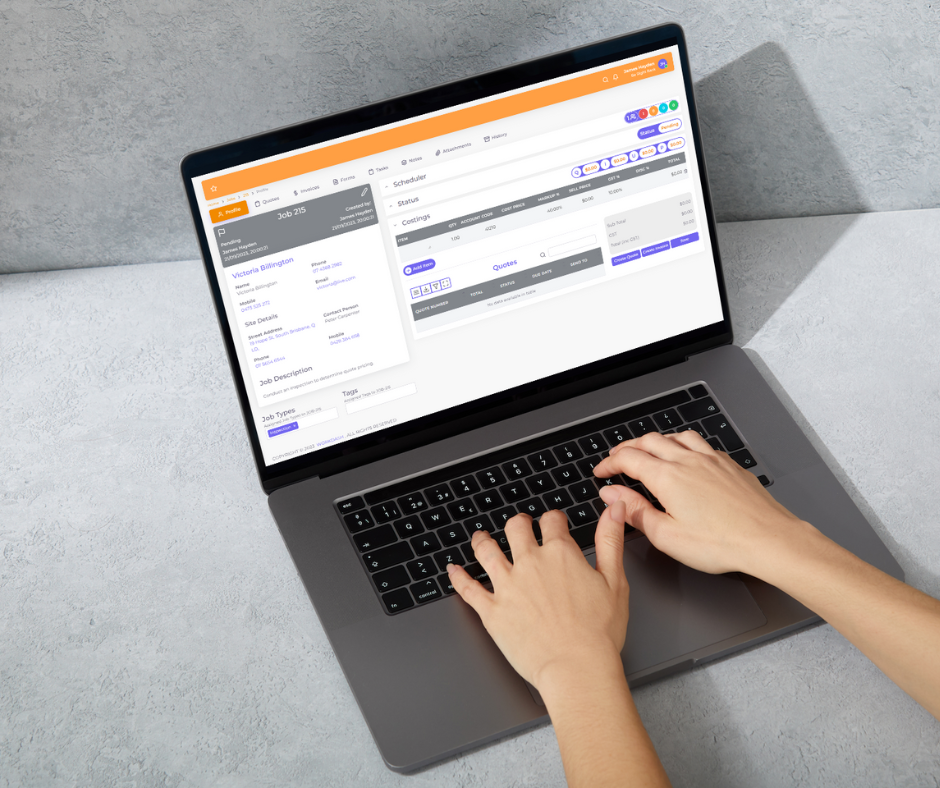
With WorkDash, your team can collaborate in real-time, manage tasks and projects, and update job statuses directly from the field using mobile devices. The system ensures that every team member—from office admin to technicians—shares access to the same live data.
This eliminates the communication gap between the field and office, helping businesses stay connected while working remotely and improving efficiency across all departments.
Why Staying Connected While Working Remotely Is Crucial for Success
When your team is working remotely, communication becomes the foundation for success. Teams that stay connected perform better, resolve issues faster, and maintain stronger client relationships.
Lack of connectivity can lead to duplicated efforts, delayed updates, and a breakdown of trust. WorkDash solves this by allowing team members to share messages, files, and updates in real-time, keeping communication transparent and workflows synchronized.
For remote field teams, this means everyone knows what’s happening, from task completion to customer updates—no matter where they are located.
How to Manage Remote Teams Without Losing Productivity
Managing remote and hybrid teams requires clear expectations, consistent workflows, and accountability tools. Traditional methods like spreadsheets or manual time tracking can’t keep up with today’s fast-paced environment.
Using WorkDash, managers can assign tasks, monitor productivity and performance, and view time spent across tasks using integrated time tracking features. The system’s real-time dashboards give instant insights into project progress, enabling leaders to make faster, data-driven decisions.
With automation, field teams no longer need to report manually—reducing delays and improving overall productivity while ensuring that remote workers stay on track.
What Are the Best Tools for Managing Remote Employees?
Choosing the right tools is critical for managing remote teams effectively. While Microsoft Teams, Slack, and Trello offer great communication and planning options, service-based businesses often need something more—tools that connect project management, client data, CRM, and billing into one system.
That’s where WorkDash excels. It combines team management, scheduling, and workflow automation with powerful features like job tracking, invoicing, and client communication. This eliminates the need for multiple platforms and gives your remote field teams everything they need in one place.
In short, WorkDash helps businesses manage remote teams seamlessly and keep projects moving forward without jumping between apps.
How to Improve Team Communication and Collaboration
Strong communication keeps remote field teams united and aligned with company goals. However, too many tools and inconsistent updates can create confusion.
WorkDash provides a unified workspace for remote collaboration, ensuring that every team member can collaborate in real-time on shared tasks and client updates. Unlike email threads, messages within WorkDash are connected to projects, making it easier to follow progress and keep context.
To foster stronger teamwork, managers can hold virtual team meetings, schedule video conferencing sessions, and encourage team building through virtual happy hours or shared updates—helping remote employees feel engaged and valued.
How WorkDash Helps Teams Stay Productive from Anywhere
Field technicians, contractors, and mobile staff need systems that work wherever they are. WorkDash’s mobile-friendly design ensures that remote workers can work remotely without losing access to the information they need.
From job assignments to real-time updates, the platform gives teams a single place to stay productive and organized. Automation further enhances this process, automatically assigning tasks, sending reminders, and updating project timelines to keep your team on schedule.
Unlike generic apps, WorkDash was built for service businesses with remote field teams, giving them the tools to manage clients, jobs, and payments without being tied to an office.
How to Build a Strong Company Culture for Remote Teams
One of the biggest challenges in managing remote or distributed teams is building and maintaining company culture. Without face-to-face interactions, remote employees may feel disconnected from the organization’s mission and values.
To create a culture that supports remote work, businesses must prioritize inclusion, communication, and recognition. Managers can use WorkDash to send appreciation messages, celebrate milestones, and ensure that achievements are visible across the team.
Regular check-ins and transparent communication build trust, keeping workers engaged and reinforcing a sense of belonging—even without a physical workspace.
What Are the Best Practices for Managing Remote Field Teams?
Effective management of remote teams depends on a few key best practices:
Set clear goals and responsibilities – Every team member should know what’s expected, by when, and how success is measured.
Use automation and reporting – Tools like WorkDash eliminate guesswork with real-time tracking and automatic updates.
Promote communication – Encourage team members to collaborate, ask questions, and share updates daily.
Measure performance – Use dashboards to review productivity and identify areas for improvement.
Build connections – Create opportunities for interaction to help your team stay motivated and aligned.
These principles, combined with the right tools, make remote field teams more productive, cohesive, and customer-focused.
How Hybrid Teams Can Work Seamlessly Across Locations
As more companies adopt hybrid teams, balancing in-office and remote work can be tricky. Differences in communication styles and work hours often create gaps in productivity.
WorkDash bridges this divide by offering a centralized system where hybrid teams can manage their workflow, share updates, and access data from anywhere. Everyone—whether in-office or on the road—can contribute equally through the same platform.
This unified approach ensures that remote employees and office staff remain connected, making collaboration effortless and results consistent.
How to Track and Support Remote Workers for Better Results
Managing a remote team is not just about monitoring performance—it’s about providing the right support. With WorkDash, managers gain complete visibility into tasks and projects, allowing them to see who’s working on what, track progress, and identify bottlenecks.
Features like time tracking, job allocation, and real-time reporting make it easy to ensure that work is balanced and no one is overburdened. Managers can provide guidance, adjust workloads, and ensure employees feel supported.
This proactive management approach improves both productivity and job satisfaction, helping businesses get the best out of their remote workers.
Key Takeaways: Keeping Remote Teams Connected and Productive
WorkDash empowers remote field teams to stay connected and efficient, no matter where they work.
Integrated CRM, workflow, and communication tools replace scattered apps like Slack and Microsoft Teams.
Real-time tracking and automation boost productivity, reduce confusion, and keep teams aligned.
Strong communication and company culture are essential for managing remote employees successfully.
Using the right tools and best practices ensures remote collaboration stays seamless—even across different time zones.
In conclusion, keeping remote workers connected isn’t about micromanaging—it’s about empowering your team to communicate, collaborate, and deliver results from anywhere. With WorkDash, businesses can manage remote field teams effectively through a single, powerful platform built for modern service operations.
👉 Explore WorkDash.software to see how you can connect your remote employees, streamline operations, and create a stronger, more productive team—no matter where they work.