Table of Contents
Job Management Software Job Tracking Best Practices for Every Small Business: A Comprehensive Guide to Implement Job Management Software in WorkDash and Streamline Productivity
Short summary:
Job tracking can feel messy when you’re running a small business—jobs change, team members are busy, and updates get lost. This comprehensive guide explains job tracking best practices for small businesses using WorkDash, including how to implement job management software, improve productivity, and streamline business processes with real-time visibility. You’ll learn practical steps to ensure jobs stay on schedule, job details stay accurate, and business owners can make decisions with confidence—using WorkDash as software for your business (and importantly, a business management platform, not an ERP).
Article Outline
What Does Job Tracking Mean in a Small Business and Why Is It Essential?
How Does Job Management Software Help Small Businesses Streamline Operations?
Why WorkDash for Job Tracking: What Makes It the Right Software for Your Business?
Steps to Implement Job Management Software in WorkDash Without Disrupting Work
Best Practices for Job Tracking: How to Ensure Job Details and Job Progress Stay Accurate
How to Use Real-Time Updates to Monitor Job Progress in Real-Time and Boost Productivity
Job Scheduling Software and Scheduling Software Tips: How to Keep Job Schedules Under Control
How Small Teams Can Use Project Management and Task Management to Track Job Progress
Job Costing and Financial Management: How Job Tracking Supports Cash Flow and Better Decisions
FAQs on Job Tracking in WorkDash for Small Business Owners and Trade Businesses
1. What Does Job Tracking Mean in a Small Business and Why Is It Essential?
Job tracking is the process of recording, updating, and reviewing the status of work from start to finish. For a small business, job tracking is more than “where is the job up to?”—it includes job details, job schedules, job allocation, who is responsible, and what’s needed next. When job tracking is weak, the same problems show up repeatedly: missed deadlines, forgotten tasks, unclear responsibility, and customers chasing updates.
Many small businesses rely on memory, chats, or spreadsheets, but as the business grows, those tools break down. That’s where job management software becomes essential for small operations. It gives business owners and team members a shared place to track job, organise job progress, and ensure work is consistent and repeatable. In a trade business, where you might run multiple jobs per day, job tracking can be the difference between “busy” and “profitable.”
Good job tracking also improves business operations because it brings clarity to business processes. You can ensure you’re measuring what matters, identifying delays early, and resolving issues before they become expensive. When job tracking is done right, you don’t just “finish jobs”—you build a system that helps businesses deliver consistent results.
2. How Does Job Management Software Help Small Businesses Streamline Operations?
Job management software is designed to bring your work into a single system so you can streamline how jobs move from inquiry to completion. Instead of juggling notes, emails, and multiple tools, a job management system centralises job tracking, planning, and follow-up so everything is visible to the right people at the right time. This makes it easier to ensure tasks don’t get missed and responsibilities don’t get blurred.
For many small businesses, the biggest benefit is control. You can ensure job progress updates happen consistently, track job progress across your workload, and reduce time spent searching for information. Job management software can also help businesses organise team members, set expectations, and create routines that support predictable delivery. That’s why small business owners often say it helps them “get their business back.”
When you use job tracking software as part of daily work, you save time because updates become part of the workflow—not something you try to remember later. This is especially valuable for small teams where every person matters. With the right job management software, businesses streamline operations and remove friction that drains productivity.
3. Why WorkDash for Job Tracking: What Makes It the Right Software for Your Business?
WorkDash is built for businesses that need practical job tracking without heavy complexity. It’s not an ERP—it’s business management software designed to help small business owners manage jobs, team coordination, and business processes in one place. If your business needs a clear view of what’s happening across your work, WorkDash helps create structure that grows with your business.
A key reason WorkDash stands out is that it supports real-time visibility and real-time updates while keeping the process simple for team members. You can ensure job details are stored consistently, progress tracking is easy, and the job management software supports how you actually work. That makes WorkDash a strong option when choosing the right job management for service businesses and trade businesses.
WorkDash offers software solutions that allow businesses to handle job tracking, project tracking, and task management in a unified workflow. That means fewer tools, fewer gaps, and better accountability. WorkDash helps small teams stay organised while still being flexible enough for the real world.
4. Steps to Implement Job Management Software in WorkDash Without Disrupting Work
Implementing job management software can feel scary because business owners worry it will slow the team down. The best approach is to implement in small steps and focus on your pain points first. The goal is not to “digitise everything overnight,” but to ensure job tracking improves quickly and smoothly.
Here are practical steps to implement job management in WorkDash:
Start with one workflow (for example: job creation → scheduling → completion).
Set up consistent job details so team members know what “done” looks like.
Define simple job statuses to track job progress clearly (for example: New, Scheduled, In Progress, Completed).
Train small teams first, then expand.
This approach helps you implement job management software with minimal disruption. It also ensures team members build habits around updating progress tracking and using the system daily. Implementing job doesn’t need to be complex—it just needs structure and consistency.
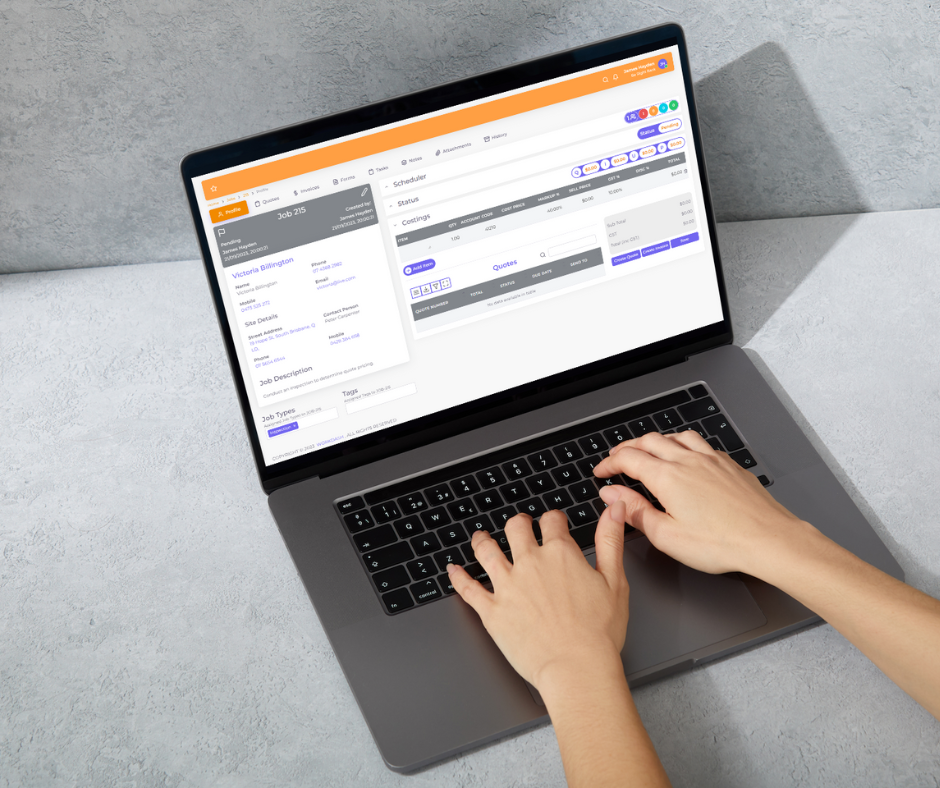
WorkDash’s job setup supports a practical rollout. WorkDash’s job features like job tracking help you set a clear baseline, so you can see improvements quickly and keep momentum as your business grows.
5. Best Practices for Job Tracking: How to Ensure Job Details and Job Progress Stay Accurate
The number one job tracking issue in many small businesses is inconsistent updates. Someone finishes part of a job but forgets to update it, or key job details are stored in a message thread instead of the system. The best practices start with standardisation and accountability.
Here are proven best practices:
Ensure every job has complete job details efficiently before it’s assigned.
Ensure each job status update happens at specific moments (arrival, start, completion).
Ensure notes and outcomes are recorded in the job, not in private messages.
Ensure ownership is clear—one person should be responsible for updating job progress.
When you follow these best practices, you prevent “silent delays” where work stalls without anyone noticing. That improves productivity and helps businesses to track work more reliably. It also creates a repeatable system that helps small businesses operate like larger organisations without the overhead.
Using job management software makes this easier because the workflow is built around consistent updates. Features like job tracking support clarity and reduce confusion across team members.
6. How to Use Real-Time Updates to Monitor Job Progress in Real-Time and Boost Productivity
Real-time information is one of the biggest advantages of modern job management software. When you can monitor job progress in real-time, you catch issues early and respond quickly. Instead of discovering problems at the end of the day, you can act while the job is still in motion.
To use real-time job tracking effectively, you need simple habits:
Ensure team members update status changes immediately.
Ensure notes are added when something changes (delay, extra work, customer request).
Ensure managers review the dashboard at set times daily to catch bottlenecks.
This is where real-time updates create real value. You gain visibility across jobs and understand where work is slipping. That helps you optimise job performance, protect customer relationships, and improve productivity with fewer surprises.
WorkDash helps you optimise this approach by making real-time updates easy to capture and review. WorkDash provides a clear overview so small business owners can make quicker decisions with confidence.
7. Job Scheduling Software and Scheduling Software Tips: How to Keep Job Schedules Under Control
Scheduling is where many small businesses feel the most pressure. Jobs shift, customers reschedule, and staff availability changes. If you’re not using job scheduling software, you can end up overbooked, underbooked, or constantly reacting. That’s why small businesses need scheduling software that’s connected to job tracking.
A strong approach is to build a weekly planning rhythm:
Ensure you review job schedules at the same time each week.
Ensure urgent jobs are flagged early.
Ensure job allocation matches skills and availability.
Ensure schedule changes are recorded immediately to avoid confusion.
When scheduling software is connected to job tracking, your schedule reflects reality. That means fewer missed appointments and less time spent fixing scheduling mistakes. It also helps businesses streamline and improves customer experience.
WorkDash supports job scheduling software inside your workflow, so scheduling and job tracking work together. This keeps planning consistent and reduces the chaos that many small businesses face.
8. How Small Teams Can Use Project Management and Task Management to Track Job Progress
Small teams often wear multiple hats. That makes task management critical because people can’t rely on memory when everything is moving fast. For businesses looking to grow, light project management structures can make a big difference—even if you’re not running “projects” in the corporate sense.
Here’s a practical approach:
Break work into tasks inside the job so team members know the next step.
Ensure task management is simple and aligned with your business processes.
Use project management views for multi-day jobs or complex work.
This helps businesses ensure work is not only completed, but completed in the right order and with clear ownership. Project tracking becomes easier, and job progress becomes visible to everyone who needs it.
WorkDash offers management tools that support task management and project management without turning your business into a paperwork factory. The goal is to streamline execution, not add admin.
9. Job Costing and Financial Management: How Job Tracking Supports Cash Flow and Better Decisions
Job tracking isn’t just operational—it’s financial. When job details are accurate and job progress is up to date, you can understand profitability, identify overruns, and make smarter decisions. This is where job costing and financial management become part of daily discipline, not end-of-month stress.
A simple best practice is to ensure you capture time and costs consistently. For example:
Record materials and labour against each job.
Track job progress so you know what’s billable and when.
Use reporting to spot trends and prevent repeat losses.
This supports cash flow because you invoice faster and more accurately. When you know what is completed and what is still in progress, you can plan billing and keep money moving through the business.
WorkDash helps small businesses connect operational work to financial outcomes. It also works well alongside accounting software so your records stay clean and your business needs are supported end-to-end.
10. FAQs on Job Tracking in WorkDash for Small Business Owners and Trade Businesses
FAQs on job tracking is important because small business owners often ask the same practical questions when adopting new systems. Below are common questions with straightforward answers to help you implement and succeed.
Q1: How do I choose the right job management software for my business needs?
Look for right software that fits your workflow, supports job tracking, and is easy for team members to use. The right job management software should meet your business needs today and grow with your business.
Q2: What’s the biggest mistake many small businesses make when implementing job management software?
The biggest mistake is trying to implement everything at once. Start with your pain points, ensure consistent job statuses, and build habits gradually. This makes implementing job successful.
Q3: Can a trade business benefit from WorkDash even with a small team?
Yes. WorkDash is perfect for small teams because it helps businesses to manage schedules, job allocation, and progress tracking without requiring enterprise complexity.
Q4: How does customer relationship management fit into job tracking?
Customer relationship management supports better communication and repeat work. When jobs and customer records are linked, you ensure context is always available and service is consistent.
Q5: Do I need project management tools if I’m not a “project business”?
Even simple project management tools help when jobs span multiple days or involve multiple team members. It improves organisation and ensures tasks don’t get missed.
Q6: What if my team forgets to update job statuses?
Make it part of your process. Ensure updates happen at key moments. Keep statuses simple. Review daily. Over time, it becomes habit.
Key Takeaways: What to Remember
Job tracking is essential for every small business that wants control and predictability.
Job management software helps small businesses streamline business processes and improve productivity.
WorkDash is business management software (not an ERP) designed to help small businesses track job progress.
Implement gradually: focus on pain points, simple job statuses, and consistent job details.
Ensure real-time updates are used daily to monitor job progress in real-time and maintain visibility across work.
Scheduling software and job scheduling software reduce chaos and keep job schedules realistic.
Task management and project management help small teams stay aligned and accountable.
Job costing and financial management become easier when job tracking is accurate, supporting cash flow.
Choosing the right job management starts with your business needs and team adoption.
WorkDash helps you optimise job workflows as your business grows—without overcomplicating operations.